

How to Choose a Studio Chair for Long Recording Sessions
Last Updated: October 28, 2026
Quick Summary
The best studio chair for long recording sessions is one that supports your lower back, fits your desk and under-desk space, and suits how you move between console, keyboard, and monitors. Measure your workspace first, then check lumbar support, seat depth, armrests, and casters before you buy.
- Measure desk height, knee clearance, and monitor height before comparing any chair.
- Seat depth should leave two to three finger-widths between the seat edge and the back of your knees.
- Set armrests so shoulders stay relaxed and elbows rest near 90 degrees.
- Rubber or polyurethane casters roll quieter and protect floors, which matters near a microphone.
- Check the return window, warranty terms, and who pays return shipping before buying.
Table of Contents
- Why Long Recording Sessions Demand a Different Kind of Chair
- Step 1: Measure Your Desk and Monitor Setup Before Shopping
- Step 2: Check Lumbar Support and Seat Depth for Hours of Sitting
- Step 3: Decide on Armrests, Swivel, and Mobility for Your Workflow
- Ergonomic Chair Options for Music Production Work
- Getting the Best Value: What a Budget Studio Chair Should Include
- Your Next Step: Set Up and Test Your Chair Before a Full Session
- Frequently Asked Questions
Why Long Recording Sessions Demand a Different Kind of Chair
Choosing the best studio chair for long recording sessions is less about style and more about how your body handles eight or ten hours at a console. A studio chair that feels fine for thirty minutes can leave you stiff by hour three. This guide walks through a practical process for picking a seat for recording sessions.
Most producers buy on looks or a quick showroom test, but long sessions expose weak lumbar support, poor seat depth, and armrests that get in the way of the console.
A good studio chair does three things well: it keeps your spine supported in a neutral position, lets you move between keyboard, mouse, and monitors without strain, and stays comfortable across the whole session.
Step 1: Measure Your Desk and Monitor Setup Before Shopping
Before you compare chairs, measure your workspace. A chair that fits a standard office desk may not suit a production console with a low work surface or deep monitor arms. If your desk is still being planned, our Content Creator Gear & Equipment range can help you think through the full workspace layout alongside your seating.
Start with these measurements:
- Desk height: Note the surface height from the floor. Many producers work at desks between 28 and 30 inches.
- Under-desk clearance: Measure the space for your knees and thighs. Chairs with wide bases or fixed armrests can clash with keyboard trays.
- Monitor distance and height: Position your monitors so the top of the screen sits near eye level when you sit upright.
| Measurement | What to Record | Why It Matters |
|---|---|---|
| Desk height | Surface height from floor | Sets the seat height you need |
| Knee clearance | Space under the desk | Prevents armrest or base collisions |
| Monitor height | Screen center vs. eye level | Affects neck and upper back posture |
| Arm reach | Distance to keyboard and mouse | Determines armrest position |
For guidance on desk and monitor arrangements, see our Ergonomic Desk Setups for Streamers: A Setup Guide.
Step 2: Check Lumbar Support and Seat Depth for Hours of Sitting
Lumbar support and seat depth matter more than almost any other feature for long sessions.
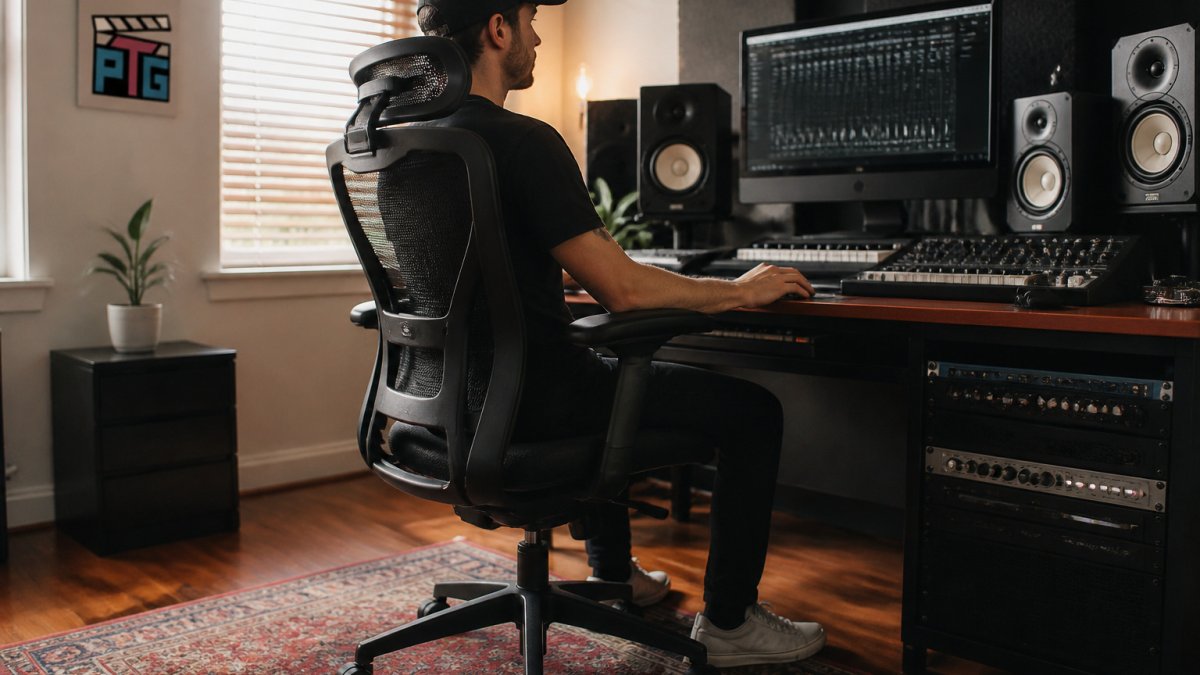
A simple fit check helps.
Look for these features:
- An adjustable lumbar pillow or built-in lumbar contour
- Pocket springs or layered foam that distribute pressure
- A seat depth that suits your leg length
The Big and Tall Gaming Chair with Footrest and Lumbar Support pairs a 3D wrapping lumbar system with pocket springs.

!A music producer seated upright at a home studio desk with mixing monitors ahead, feet flat on the floor and lower back supported by the chair
Step 3: Decide on Armrests, Swivel, and Mobility for Your Workflow
Armrests, swivel, and mobility are not universal upgrades. They are trade-offs that should follow the way you actually work. A producer at a mixing console for six hours has different needs than one who plays keys, tracks vocals, and edits between takes.
Match the chair to the task, not the room
Use this task map to decide which features earn their place:
| Studio task | Armrest priority | Swivel and mobility | What to watch |
|---|---|---|---|
| Mixing at a console | Low to medium; arms often reach forward to faders | Moderate; you rotate between console, outboard gear, and monitors | Fixed armrests can block you from pulling close to a sloped console |
| Keyboard and instrument work | Low; armrests can restrict playing posture | Low; you mostly stay planted | A seat with a slight forward tilt or a stool may suit playing better than a recliner |
| Vocal recording and tracking | Low; you stand or sit upright and move | High if you roll between the mic and the DAW | Noisy casters and squeaky upholstery can bleed into a take |
| Editing and comping | Medium to high; forearms rest during long mouse work | Moderate; you reach for shortcuts and outboard controllers | Armrest height should let your shoulders stay relaxed, not shrugged |
Producers who split time between a console and a keyboard often want armrests that flip up or remove entirely, giving forearm support during editing and clearance when pulling in close to play.
Armrests: adjustability beats padding
Armrests help most when adjustable in height and width, with pads soft enough to avoid pressure points.
For console work, check whether the armrests collide with the desk edge or keyboard tray. Fixed armrests are the usual culprit; removable or flip-up ones solve this but add a failure point, so look for metal mounting hardware rather than plastic tabs.
Swivel: smooth beats fast
A full 360-degree swivel is useful when you turn between a console, a second monitor, and a rack. What matters is smooth, predictable rotation without wobble; a chair that swivels too freely can drift when you lean. Test the swivel tension or read owner comments about wobble before buying.
Casters: quiet, floor-safe, and session-friendly
Casters are where studio workflow and recording-room reality meet. Hard plastic casters roll easily but can mark hardwood and transmit noise; rubber or polyurethane casters roll quieter and protect floors, which matters if your studio shares a room with a microphone.
- Noise: Squeaky or hard casters can be picked up by a nearby mic during quiet takes. If you track vocals or acoustic instruments in the same room, consider quiet casters or a floor mat.
- Floor protection: A polycarbonate chair mat protects hardwood and eases movement on carpet.
- Locking casters: If the chair must stay put at a console, look for brakes or a locking tilt.
The MCQ Ergonomic Gaming Chair with Footrest offers adjustable recline, a removable headrest, and 360-degree swivel casters. Check the caster type if noise is a concern.

A quick workflow test before you commit
Set up the chair at your desk and run through your actual session: reach for the keyboard, turn to the console, lean back between takes, and roll to a mic. If any movement feels blocked or noisy, the chair is fighting your workflow; adjust what you can, and if the conflict remains, keep looking.
Ergonomic Chair Options for Music Production Work
Not every chair fits every studio. Here are options in our catalog. Prices reflect current listings.
Comhoma Big and Tall Gaming Chair with Footrest and Lumbar Support →
1. MCQ Ergonomic Gaming Chair with Footrest ($128.99) Offers recline range, a retractable footrest, and a weight capacity of up to 275 lbs.
- Pros: 90° to 135° recline, adjustable lumbar pillow, removable headrest, 360° rubber casters
- Cons: Supports up to 275 lbs, so it may not suit larger users
2. FRODROVIA Ergonomic Gaming Chair ($128.99) Features memory foam support and a one-year warranty.
- Pros: 30D molded memory foam headrest and lumbar cushion, pocket spring seat, 1-year warranty
- Cons: Assembly takes about 30 minutes
3. JHK Ergonomic Reclining Gaming Chair ($211.99) Features a high back, a widened seat, and reclines up to 135°.
- Pros: BIFMA-certified base rated to 350 lbs, scratch-resistant PU leather, independent pocket spring lumbar support
- Cons: Higher starting price than the other gaming-style options
4. Comhoma Big and Tall Gaming Chair with Footrest and Lumbar Support ($207.99) Supports users up to 400 lbs and features a 3D wrapping lumbar system.
- Pros: Rated to 400 lbs, 3D wrapping lumbar system, 15 to 30 minute assembly
- Cons: Suits users from 5'1" to 6'2", which may not fit shorter or taller frames
5. SucceBuy Ergonomic Kneeling Chair ($99.99) An option for producers considering a kneeling chair.
- Pros: Angled seat encourages spinal alignment, foam-padded platforms, birch wood frame
- Cons: No casters included, and it lacks armrests and backrest support for extended reclining
Getting the Best Value: What a Budget Studio Chair Should Include
Use a buying checklist covering fit, certification, warranty, assembly, and return terms before you spend.
The budget feature checklist
Focus on features that affect comfort over hours and skip the ones you will rarely use:
- Height adjustment covers your desk height with room to spare
- Lumbar support is adjustable or contoured to your lower back
- Seat depth leaves two to three finger-widths behind your knees
- Base is rated for your body weight and, ideally, carries a BIFMA certification
- Armrests move, flip up, or remove if you work close to a console
- Casters roll smoothly and quietly on your floor type
Reduce the risk before you buy
Use these steps to assess whether a chair fits:
- Check the return window and who pays return shipping. A 30-day window is common, but some sellers charge return freight on large items, which can erase the savings.
- Confirm the warranty covers the parts that fail first. Look for a warranty that names the parts it covers.
- Read the assembly requirements. Check that the hardware is labeled and the instructions match the model.
- Test in person if you can. Sit in the chair at a store, or buy from a seller with a generous return policy if ordering online.
- Measure before you assemble. Compare height range, seat depth, and base width to your desk and room before the box arrives, so you can return it unassembled if specs do not match.
Where to spend and where to save
When comparing chairs, consider seat foam, lumbar support, and base features alongside cosmetic details. Compare the listed features with your needs.
The Budget Studio Monitors for Small Rooms: Setup Guide covers how to get the most from a modest studio budget, which helps when you are splitting spending between seating and monitors.
A final value check
Before you buy, consider the chair price, any additional costs, and assembly time. Compare the listed features with your needs and budget.
Your Next Step: Set Up and Test Your Chair Before a Full Session
Once your chair arrives, follow its assembly instructions. If you are also upgrading the rest of your recording setup, Cameras, Lighting & Audio Equipment is worth a look.
Test the chair and adjust its settings before committing to longer sessions. If it does not suit your needs, review the seller's return terms.
Choosing a studio chair for long recording sessions involves measuring your space, checking the chair's listed features, and considering how it fits your needs.
Frequently Asked Questions
What is the best studio chair for long recording sessions?
When choosing a studio chair for long recording sessions, consider desk height, lower-back support, and fit. Compare the chair's listed features with your needs.
How do I know if a studio chair fits my desk?
Measure your desk height and under-desk clearance, then compare those numbers to the chair's listed dimensions and features.
Do I need a chair with armrests for music production?
Consider whether armrests suit your workspace and preferences. Check the chair's listing for its armrest features.
Is a kneeling chair good for long studio sessions?
The SucceBuy Ergonomic Kneeling Chair is a kneeling chair with foam-padded platforms and a birch wood frame. Review its listed features to decide whether it suits your needs.
Frequently Asked Questions
What should I look for in a chair for long recording sessions?
Compare the chair's listed features, dimensions, and price with your needs and workspace before buying.
Are ergonomic office chairs good for music production?
The Comhoma Big and Tall Gaming Chair is rated to 400 pounds and has a height-adjustable frame and a 3D wrapping lumbar system. Compare its listed features with your desk and needs.
How much should I spend on a comfortable studio chair?
Perfect Take Gear's chairs in this guide start at $99.99 for the SucceBuy Ergonomic Kneeling Chair, $128.99 for the MCQ Ergonomic Gaming Chair and the FRODROVIA Ergonomic Gaming Chair, $207.99 for the Comhoma Big and Tall Gaming Chair, and $211.99 for the JHK Ergonomic Reclining Gaming Chair. Prices suit different body sizes and needs, so compare features such as lumbar support and weight capacity against your budget rather than price alone.
