

Ergonomic Desk Setups for Streamers: A Setup Guide
Table of Contents
- Why Ergonomic Desk Setups Matter for Streamers
- Gaming Desk Ergonomics: Foundation and Layout
- Monitor Height for Streaming and Viewing Distance
- Chair Selection and Seated Posture for Long Sessions
- Streaming Microphone Placement and Camera Position
- Small Streaming Desk Setup: Maximizing Limited Space
- Breaks, Movement, and Fatigue Management
- Your Ergonomic Streaming Setup Checklist
- Frequently Asked Questions
Last Updated: October 12, 2026
Why Ergonomic Desk Setups Matter for Streamers
Long streaming sessions take a real toll on your body.
Ergonomic desk setups for streamers address this directly. The goal is simple: position your equipment so your body stays neutral and relaxed, even during marathon sessions.
Perfect Take Gear provides creator gear, gaming accessories, cameras, lighting, audio equipment, studio essentials, and innovative tech designed to help creators, gamers, streamers, and everyday users build better setups.
This guide covers the exact setup decisions that matter: desk height, monitor placement, chair selection, equipment positioning, and strategies for staying comfortable during long sessions.
Gaming Desk Ergonomics: Foundation and Layout
Your desk is the foundation of everything. A poorly chosen desk forces compromises throughout your entire setup. The right desk makes everything else fall into place.
Gaming desk ergonomics starts with understanding that your desk height directly determines your arm and shoulder position. If your desk is too high, your shoulders creep toward your ears. Too low, and you hunch forward. The sweet spot is a desk where your elbows bend at 90 degrees when your hands rest on the keyboard, with your shoulders relaxed and your forearms parallel to the floor.
Desk Height and Work Surface Organization
Standard desk height is 28-30 inches, which works for most people of average height. If you're taller than 6 feet or shorter than 5'4", you may need an adjustable or custom-height desk to hit that 90-degree elbow angle.
Desk surface organization matters as much as height. You need enough space to accommodate monitors, a keyboard, a mouse, a microphone, a camera, and stream controls without cramping everything together.
A two-tier desk shelf can help reclaim vertical space without eating into your work surface. Ergonomic desk organization research from Cornell University shows that vertical storage reduces the need for horizontal reach, lowering shoulder and neck strain during extended sessions.

Desk Space and Shape for Streaming Equipment
Streaming equipment takes up real estate. You need space for:
- Two monitors (game and chat)
- A keyboard and mouse
- A microphone and boom arm
- A camera or phone mount
- Stream controls (Stream Deck, macro pad, or similar)
- Cables, headset, and other accessories
An L-shaped desk gives you the most flexibility. One arm holds your main gaming monitor and controls. The other arm holds your chat monitor and microphone.
If you're working with a smaller space, a single wide desk (at least 48-60 inches) can work. Prioritize depth, at least 24-30 inches, so monitors sit at a comfortable viewing distance without pushing other equipment off the edge.
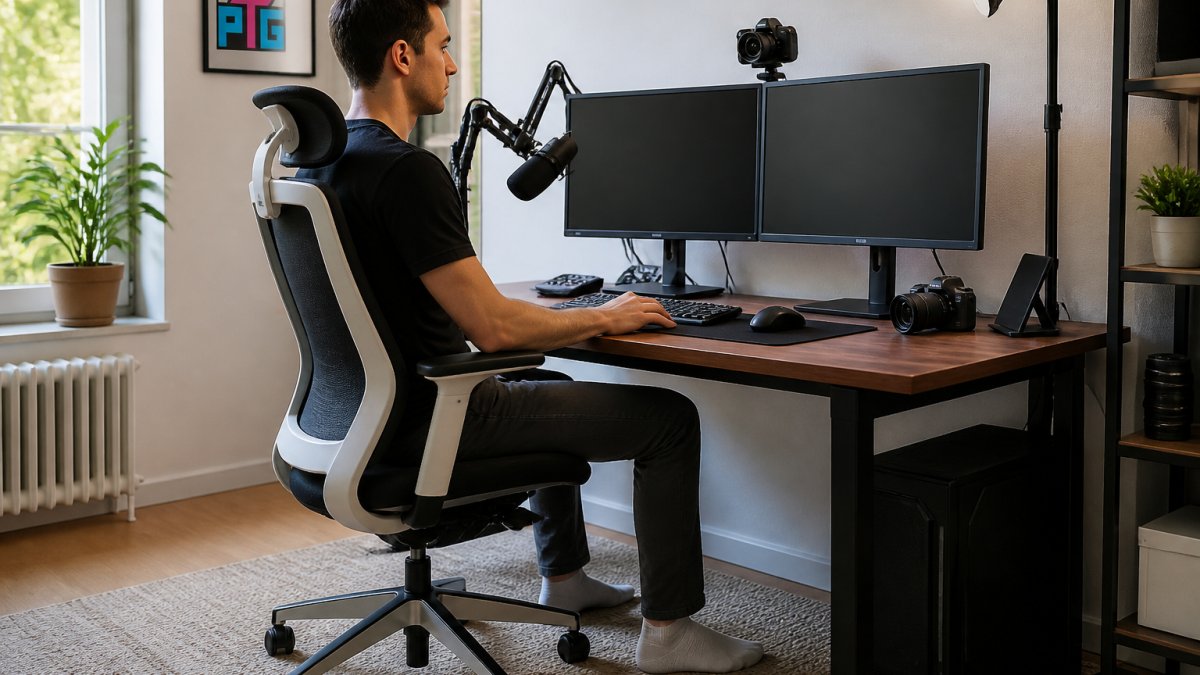
Monitor Height for Streaming and Viewing Distance
Monitor placement is where most streamers go wrong. Your monitors should sit at eye level when you're looking straight ahead, not down, not up. Looking down for hours rounds your shoulders and flexes your neck. Looking up strains your upper back.
The top of your primary monitor should be at or slightly below eye level. If you're sitting with good posture, your gaze should naturally fall on the upper third of the screen.
Viewing distance matters too. Sit an arm's length away from your primary monitor, roughly 20-26 inches. This distance lets you see the full screen without leaning forward or straining your eyes.
Multi-Monitor Configurations for Chat and Game
Streamers typically use two monitors: one for the game and one for chat, alerts, and stream controls. The question is how to arrange them.
The most ergonomic setup places your primary gaming monitor directly in front of you, at eye level. Your chat monitor sits to the side at a slight angle, rotated inward 30-45 degrees.
Avoid stacking monitors vertically. Looking down at a lower monitor for extended periods flexes your neck and rounds your shoulders. Avoid placing both monitors side-by-side at the same distance either, that forces you to choose which one is "center" and creates asymmetrical viewing angles.
A gas spring dual monitor mount gives you precise control over each screen's height, angle, and distance. The Gas Spring Dual Monitor Desk Mount with VESA Swivel Bracket lets you reposition both displays with one hand, so you can adjust throughout the day as fatigue shifts your posture.

Chair Selection and Seated Posture for Long Sessions
Your chair is the second most important investment after your desk. A bad chair will undermine even a perfect desk setup.
Look for a chair with these features:
- Adjustable seat height so your feet rest flat on the floor
- Lumbar support that matches the curve of your lower back
- Armrests at elbow height when your arms are at rest
- A recline function for position changes during long sessions
- A wide, stable base that won't tip
The Comhoma Big and Tall Gaming Chair with Footrest and Lumbar Support delivers all of these. It supports users up to 400 pounds with a 3D wrapping lumbar system that adjusts to your spine's natural curve.

Seated posture during streaming should follow this pattern:
- Feet flat on the floor or footrest
- Knees at 90 degrees
- Back against the chair with lumbar support engaged
- Shoulders relaxed, not shrugged
- Elbows at 90 degrees
- Wrists neutral, not bent up or down
- Head level, not tilted forward
Streaming Microphone Placement and Camera Position
Microphone placement affects both audio quality and your posture. If your microphone is too far away, you'll lean forward to reach it. If it's too high, you'll crane your neck. If it's too low, you'll hunch.
Gas Spring Dual Monitor Desk Mount with VESA Swivel Bracket →
The ideal microphone position is 6-12 inches from your mouth, at mouth level or slightly above. A boom arm mounted to your desk keeps the microphone in that zone without taking up desk space. Position the arm so you can reach the microphone naturally without stretching or twisting.
Your camera or phone should sit at eye level or slightly above. When setting up Cameras, Lighting & Audio Equipment, proper positioning is just as important as the gear itself, your camera angle and microphone placement directly impact both your video quality and your physical comfort during long streams.
Keyboard and Mouse Placement
Your keyboard and mouse should sit on your desk surface at the same height as your elbows when your arms are at rest. This keeps your wrists neutral and prevents the downward bend that leads to carpal tunnel strain.
Position your keyboard directly in front of you, centered with your body. Your mouse should sit immediately to the right of the keyboard (or left, if you're left-handed) at the same height.
Many streamers use a keyboard tray that mounts under the desk to lower the keyboard below desk level.
Small Streaming Desk Setup: Maximizing Limited Space
Not every streamer has room for a full L-shaped desk and dual monitors. If you're working with a small space, smart choices let you build an ergonomic setup anyway.
Start with a single 24-27 inch monitor positioned directly in front of you at eye level. This is your primary screen for gameplay and chat. Skip the second monitor for now, you can add it later.
Use a phone stand for secondary monitoring. An adjustable phone desktop stand can hold your phone or tablet to the side of your monitor, displaying chat or alerts without taking up desk space. The Adjustable Phone Desktop Stand provides stable positioning and can be angled to reduce neck strain.
Vertical storage is your friend in small spaces. The Carbon Steel Two-Tier Desk Shelf clamps to your desk edge and supports up to 22 pounds per tier, giving you organized storage without floor footprint.
For a small streaming desk setup, prioritize:
- A single monitor at eye level
- A chair with lumbar support
- Vertical storage for equipment
- A compact keyboard and mouse
- A phone stand for secondary monitoring
Breaks, Movement, and Fatigue Management
Even a perfect ergonomic setup won't save you if you sit motionless for 8 hours.
Take a 5-minute break every 60 minutes. Stand up, walk around, and stretch.
Stretch your neck by tilting your head toward each shoulder, holding for 15-20 seconds. Shrug your shoulders up toward your ears, then relax them.
Change your position during breaks. If you've been sitting upright, recline slightly. If you've been leaning forward, lean back.
Stand while streaming if you can. A height-adjustable desk lets you alternate between sitting and standing throughout your session.
Watch for early warning signs: neck tension, shoulder tightness, lower back discomfort, or wrist pain.
Your Ergonomic Streaming Setup Checklist
Use this checklist to evaluate and optimize your current setup or plan a new one:
| Setup Element | Target | Status |
|---|---|---|
| Desk height | Elbows at 90° when hands on keyboard | ☐ |
| Desk space | 48+ inches wide for dual monitors and equipment | ☐ |
| Primary monitor | Eye level, 20-26 inches away | ☐ |
| Secondary monitor | Angled 30-45° to the side | ☐ |
| Chair seat height | Feet flat on floor, knees at 90° | ☐ |
| Lumbar support | Engaged, matching lower back curve | ☐ |
| Keyboard position | Elbows at 90°, wrists neutral | ☐ |
| Mouse position | Same height as keyboard, within arm's reach | ☐ |
| Microphone | 6-12 inches from mouth, at mouth level | ☐ |
| Camera | At eye level or slightly above | ☐ |
| Breaks | 5 minutes every 60 minutes of streaming | ☐ |
Start with the elements that matter most for your current pain points. If your neck hurts, fix monitor height first. If your lower back aches, invest in a chair with lumbar support. If your wrists are sore, adjust keyboard height and take more frequent breaks.
Perfect Take Gear offers the Content Creator Gear & Equipment and Gaming Gear & Accessories that make ergonomic desk setups for streamers practical and affordable. From monitor mounts and desk shelves to gaming chairs designed for long sessions, the right gear removes barriers to building a workspace that keeps you comfortable and healthy through years of content creation.
Frequently Asked Questions
What is the ideal monitor height for a streaming setup?
Position your monitor so the top of the screen is at or slightly below eye level when seated upright. Your eyes should naturally focus on the center of the screen without tilting your head up or down. For streamers using multiple monitors, keep your primary monitor (game or content) at this height, and position chat or secondary monitors slightly lower. This setup reduces neck strain during long streaming sessions and maintains consistent camera framing.
How far should your monitor be from your eyes when streaming?
Sit 20 to 26 inches from your monitor. At this distance, you can see the entire screen without eye fatigue and your peripheral vision captures important elements like chat alerts or stream controls. If you're using multiple monitors for gaming desk ergonomics, maintain this distance from your primary screen. Adjust based on your screen size: larger displays may sit slightly farther back, smaller ones slightly closer.
What chair features matter most for long streaming sessions?
Look for a chair with adjustable lumbar support, armrests, and seat height. Lumbar support maintains the natural curve of your spine during extended sessions. Armrests reduce shoulder and neck tension by supporting your arms at desk height. Adjustable seat height lets you position your feet flat on the floor with knees at 90 degrees. For streamers, consider a chair that reclines slightly for breaks without leaving your setup. Models like the Comhoma Big and Tall Gaming Chair include these features and support users up to 400 pounds.
How can I set up a small streaming desk more ergonomically?
Prioritize vertical storage to free up horizontal work surface. Use a two-tier desk shelf to organize cables, routers, and reference materials above or below your desk surface without consuming floor space. Mount your monitor on a gas spring arm to eliminate monitor stands that take up desk real estate. Position your keyboard and mouse on the desk surface itself rather than on separate stands. Keep only active streaming equipment within arm's reach: microphone, camera, and stream controls. This approach maximizes your small streaming desk setup while maintaining proper ergonomic positioning.
Building an ergonomic streaming setup takes intentional choices, but the payoff is immediate. Streamers who optimize their desk, chair, monitor placement, and equipment positioning report less pain, better focus, and longer sustainable streaming sessions. Start with the checklist above, make one or two key upgrades, and pay attention to how your body responds. Small adjustments compound into big improvements in comfort and health.