

Studio Monitors vs Gaming Monitors for Producers
Table of Contents
- Studio Monitors vs Gaming Monitors: Core Differences
- Frequency Response and Sound Accuracy
- Best Studio Monitors for Music Production
- Music Production Monitor Setup: Placement and Room Acoustics
- Studio Monitors vs Headphones for Production Work
- Can You Use Gaming Monitors for Production?
- Choosing the Right Setup for Your Workflow
- Frequently Asked Questions
Last Updated: October 21, 2026
Studio Monitors vs Gaming Monitors: Core Differences
When producers sit down to choose speakers, they face a fundamental question about studio monitors vs gaming monitors. The answer hinges on what each type is engineered to do.
Studio monitors are built for accuracy. They reproduce sound as flatly as possible across the frequency spectrum, which means minimal bass boost, minimal treble enhancement, and minimal coloration. This flat frequency response lets producers hear exactly what they've recorded without the speaker adding its own sonic character. The goal is transparent reference sound.
Gaming monitors, by contrast, prioritize entertainment. They enhance bass, lift treble, and color the sound to make explosions feel impactful and dialogue pop. A 1ms response time and high refresh rate matter for gaming, but those specs have nothing to do with audio production.
This distinction matters because mixing on inaccurate speakers leads to mixes that sound great in the studio but fall apart everywhere else.
The difference between mixing on the right speakers and the wrong ones is the difference between a mix that translates and one that doesn't. If you're building a production setup, Content Creator Gear & Equipment can help you find the right monitors and accessories for your space and workflow.
Frequency Response and Sound Accuracy
Frequency response is where studio monitors and gaming monitors diverge most sharply. A studio monitor's frequency response curve should be as flat as possible, ideally within ±3dB across the audible range from 20Hz to 20kHz. This means the speaker doesn't favor any particular frequency band.
Gaming speakers, by contrast, often have a presence peak in the upper midrange (around 2-5kHz) to make dialogue crisp, and a bass boost below 100Hz to emphasize low-frequency impact. These peaks feel good during gameplay but create mixing problems.
When a producer mixes on a speaker with a bass boost, they instinctively reduce bass in their mix to compensate for what they hear. On a flat-response monitor, that same mix suddenly sounds thin.
This is why frequency response matters more than any other spec. A speaker's ability to reproduce the mix accurately determines whether the producer's decisions translate to other playback systems.
The Audio Engineering Society guidelines on monitor design emphasize the importance of flat response in professional mixing environments. Producers who invest in accurate monitoring spend less time remixing and more time creating.
Best Studio Monitors for Music Production
Choosing studio monitors depends on room size, budget, and the type of work. Nearfield monitors, designed for close listening distances of 3-5 feet, are standard for home and project studios because they minimize room reflections and let the producer hear the speaker's output more than the room's acoustic character.
Powered (active) monitors include an amplifier built into the cabinet, which simplifies setup and ensures the amp is matched to the speaker's design. This is the standard for modern music production. Passive monitors require an external amplifier and are less common in small studios.
Key specs to compare:
- Woofer size: Larger woofers (6-8 inches) reproduce bass more accurately. Smaller woofers (4-5 inches) work in treated rooms but may miss low-end detail.
- Frequency response: Look for flat response (±3dB or better) down to at least 50Hz.
- Maximum SPL: 85dB at 1 meter is adequate for most home studios. Higher SPL matters in larger rooms.
- Ports: Rear-ported monitors need wall clearance; front-ported monitors work closer to walls.
- Connectivity: XLR balanced inputs are standard. USB or optical inputs add flexibility.
The Pro Sound Web resource on monitor selection provides detailed guidance on matching monitor specs to room size and mixing style. Producers who understand these fundamentals avoid buying monitors that won't work in their actual space.
Music Production Monitor Setup: Placement and Room Acoustics
Where monitors sit matters as much as which monitors are chosen. Improper placement undermines even the best speakers.
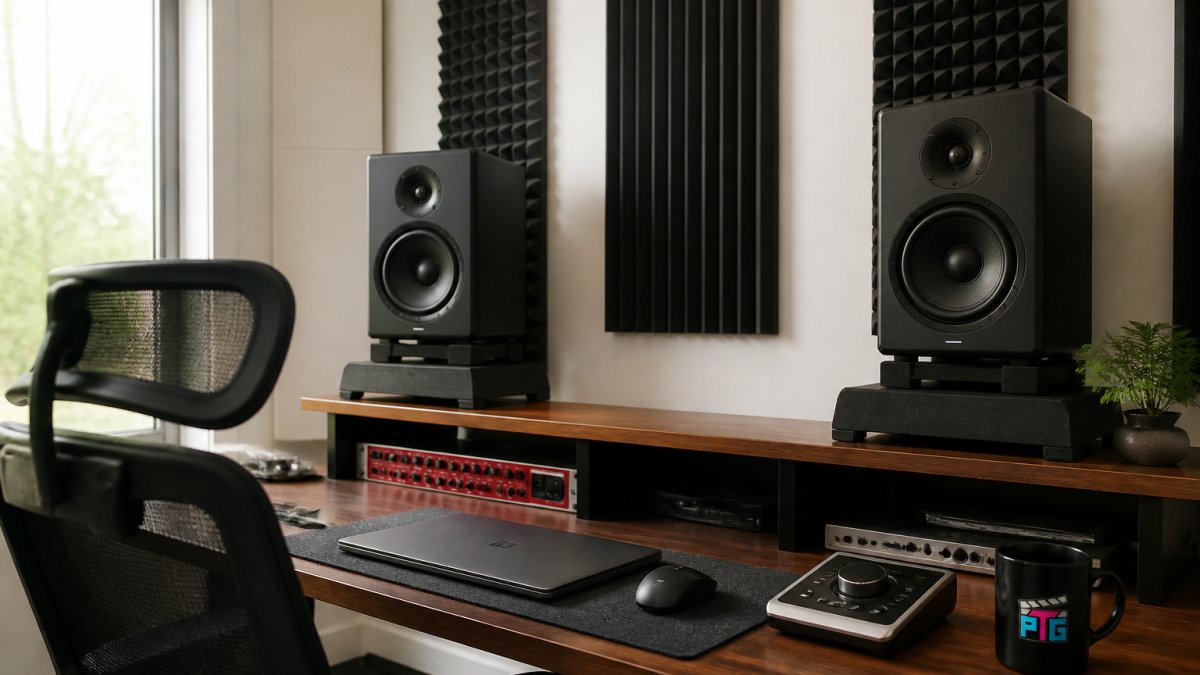
Nearfield listening position is the foundation. Position monitors at ear level when seated, forming an equilateral triangle with the listening position, roughly 3-5 feet from each speaker and 3-5 feet apart. This geometry lets the producer hear both speakers equally without one dominating.
Room acoustics affect what the producer hears. Hard, reflective surfaces (bare walls, tile floors, large windows) bounce sound around the room and muddy the mix.
Desk placement influences monitoring. Avoid placing monitors directly on the desk surface; stands or isolation pads decouple the speaker vibrations from the desk and reduce resonance. A desk directly against a wall creates a bass buildup; pulling it 12-18 inches from the wall helps.
These placement principles apply whether using studio monitors or any other speaker. A poorly placed monitor in a treated room outperforms a good monitor in an untreated corner.
Studio Monitors vs Headphones for Production Work
Headphones and studio monitors serve different roles in production. Neither replaces the other entirely; most professionals use both.
KTC 32" Curved Gaming Monitor - 240Hz →
Headphones excel at detail work: editing, comping vocals, fine-tuning EQ, and checking phase relationships. They isolate the producer from room reflections and provide a clear, detailed view of the mix. Closed-back headphones prevent sound from leaking into microphones during recording.
Studio monitors excel at balance and translation: checking stereo imaging, evaluating mix balance across the frequency spectrum, and hearing how the mix translates to other playback systems. Monitors let the producer hear the room's acoustic character, which matters because most listeners hear music in rooms, not in isolation.
The problem with relying only on headphones is that they compress the stereo field and often have a presence peak that makes mixes sound brighter than they are. A mix that sounds balanced on headphones often sounds thin and lifeless on monitors.
Best practice: use headphones for detailed work and decision-making, then check the mix on monitors to verify it translates. A mix that sounds good on both headphones and monitors will likely sound good everywhere.
Can You Use Gaming Monitors for Production?
This is the question producers ask most often, and it usually hides a terminology problem. A "gaming monitor" is primarily a display: a screen with a refresh rate (commonly 144Hz-240Hz), a response time (often 1ms GtG), a resolution (1080p to 4K), and a panel type (TN, IPS, VA, or OLED). None of those specs describe audio. The audio in a gaming setup comes from separate speakers or headphones, and that is where the production question actually lives.
So separate the two purchases before deciding anything:
The display. A gaming monitor is a fine, often excellent, choice for a production desk. High refresh rates make timeline scrolling and plugin windows feel smoother, and a 1440p or 4K panel gives you more room for a DAW arrangement view. The display has no effect on how your mix sounds. Buy the display for screen real estate and eye comfort, not for audio.
The speakers. "Gaming speakers" are a different product category: consumer speakers tuned with a bass boost and a presence lift to make games and movies exciting. That tuning is the problem for production. A bass boost below roughly 100Hz and an upper-midrange peak around 2-5kHz push you to compensate in the mix, and the compensation is what fails to translate.
Can a producer work on gaming speakers? Technically yes, and some experienced engineers can mentally subtract a known coloration. But that skill takes years to build, and a beginner cannot tell whether a mix decision is correct or is just a reaction to the speaker. The practical test is simple: play a commercial reference track you know well.
If budget is the constraint, small studio monitors with 4-5 inch woofers typically cost less than premium gaming speaker systems and serve the actual goal: hearing the mix accurately. The Sweetwater guide to studio monitor selection explains how monitor choice directly shapes mix decisions. For producers who game and produce on the same desk, the workable pattern is a gaming display for the screen and a pair of flat-response studio monitors for the audio, two tools, two jobs.
Choosing the Right Setup for Your Workflow
Most articles stop at "it depends." A producer needs a decision they can act on, so here is a practical framework built around three real scenarios: production-first, gaming-first, and mixed use.
Production-first. If mixing or mastering is part of your work and mixes must translate, the priority is a flat-response nearfield pair. A common starting point is a 5-inch powered monitor pair with balanced XLR inputs, placed in an equilateral triangle 3-5 feet from your ears, with the desk pulled 12-18 inches off the wall and isolation pads under the speakers.
Gaming-first with occasional production. If gaming and streaming are primary and production is occasional, a gaming display plus a consumer speaker set is a legitimate entertainment setup. Be honest about the limitation: mixes made on bass-boosted speakers will need checking on headphones and a second system before release.
Mixed use on one desk. This is the most common producer-gamer pattern, and it works well when you separate signal paths. Route your interface's main balanced outputs to the studio monitors for production. Route the computer's display audio or a second interface output to the gaming speakers or a soundbar for casual play.
A quick decision matrix:
- Mixing is core to your income or goals → flat-response powered studio monitors first; display second.
- Gaming is primary, production is a hobby → gaming display and consumer speakers are fine; add small studio monitors when mixes start mattering.
- Both matter equally → gaming display for the screen, studio monitors for audio, two outputs on one interface, fixed monitor gain.
- Small or shared room → 4-5 inch monitors on stands, acoustic treatment at first reflection points, and headphones for detailed work and late-night sessions.
When you're ready to build or upgrade your setup, Gaming Gear & Accessories and Cameras, Lighting & Audio Equipment can help you find everything from monitors and isolation pads to interface cables and acoustic treatment. Perfect Take Gear helps creators and producers build setups that match their actual workflow, whether that means pairing a gaming display with studio monitors or building a complete production environment around a single interface.
Frequently Asked Questions
What is the main difference between studio monitors and gaming monitors?
Studio monitors deliver flat, accurate frequency response across the full spectrum, letting you hear exactly what your mix contains without coloration. Gaming monitors prioritize high refresh rates (often 144Hz or higher) and enhanced bass or treble to make games feel immersive. Studio monitors use powered active designs with built-in amplifiers; gaming monitors are passive displays that need external speakers. For music production, studio monitors let you make mixing decisions you can trust; gaming monitors color the sound, which leads to mixes that translate poorly to other playback systems.
Can I use gaming speakers or gaming monitors for music production?
Gaming speakers and monitors are not suitable for serious music production. They're engineered to emphasize exciting frequencies, usually boosted bass and treble, which masks mixing errors. When you mix on colored speakers, your tracks sound thin or muddy on neutral playback systems like car stereos or headphones. Studio monitors for music production are built to reveal every detail, so you catch balance problems before release. If you're producing casually, gaming audio might work as a starting point, but professional mixing requires accurate reference sound.
Do I need one or two studio monitors?
Two studio monitors are the industry standard for music production. A stereo pair lets you hear accurate stereo imaging and panning, which are essential for mixing. Mono monitoring (one monitor) doesn't give you the full picture of your mix and makes it harder to judge left-right balance. Most producers use a matched pair positioned symmetrically on their desk, about ear level, forming an equilateral triangle with the listening position. If space is extremely limited, one monitor is better than none, but two monitors should be your goal.
Should I choose studio monitors or headphones for music production?
The best approach combines both. Studio monitors let you hear your mix in a room, with accurate stereo imaging and bass response that headphones can't replicate. Headphones excel at detail work and let you hear subtle issues like phase problems or unwanted noise. Most professionals mix on monitors first, then reference on headphones to catch headphone-specific artifacts. Monitors alone can mask room-acoustics problems; headphones alone can exaggerate proximity and make your mix sound unnatural on speakers. Use studio monitors as your primary mixing tool and headphones as a secondary check.