

Simple Gear for Solo Streamers: A 2026 Starter Guide
Table of Contents
- What Simple Gear for Solo Streamers Actually Means
- Essential vs. Optional: What You Really Need
- Best Budget Streaming Microphone Options
- Lighting Solutions for Small Spaces
- Streaming Setup for Beginners: Software and Capture
- Webcam and Video Capture Without Breaking the Bank
- Internet Connection, Bandwidth, and Bitrate Essentials
- Cable Management and Power Consumption on a Budget
Last Updated: August 6, 2026
What Simple Gear for Solo Streamers Actually Means
Most aspiring streamers think they need thousands of dollars in equipment before launching. The reality is different. Simple gear for solo streamers means building a functional setup with essentials: a quality microphone, basic lighting, stable internet, and streaming software. You don't need a capture card, DSLR, or mixing board to start. The difference between amateur and professional streams comes down to three things: microphone placement, basic lighting, and proper gain staging, all costing less than a decent gaming headset.
At Perfect Take Gear, we've helped creators launch by focusing on fundamentals. A $30 USB microphone with proper technique beats a $300 condenser mic with bad gain control. A ring light in a small room produces better results than expensive studio lighting requiring space you don't have. This guide covers the exact tools and strategies that work for solo streamers with tight budgets.
Essential vs. Optional: What You Really Need
Three things separate amateur streams from professional ones: audio quality, basic lighting, and stable connection. Everything else builds on these foundations.
The Non-Negotiables
Audio quality matters more than video quality. Viewers tolerate grainy video but abandon streams with echo, noise, or distortion instantly. A budget USB condenser microphone with cardioid polar pattern (focusing sound in front while rejecting sides and rear) costs $30-$100. The FIFINE K669B delivers clear voice capture at the budget end. The Rode NT-USB Mini adds a built-in pop filter reducing plosives and includes a swing mount. The Blue Yeti USB offers four selectable polar patterns and headphone monitoring for real-time audio checking.
Lighting prevents basement-stream appearance. Without proper lighting, your face appears dim or washed out. A single light source positioned at 45 degrees eliminates shadows and creates professional illumination. Ring lights like the NEEWER 18" Dimmable Bi-color LED Ring Light Kit provide soft, even light with adjustable brightness and color temperature. The Elgato Key Light Air mounts on a desk clamp, saving space while delivering 2,100 lumens of adjustable brightness.
Internet stability determines stream viability. A stable 5 Mbps upload speed supports 4,500 kbps bitrate at 1080p, 60 fps. Frame rate affects motion smoothness; 30 fps is acceptable, 60 fps noticeably smoother. Latency should stay under 3 seconds for interactive streams.
Nice-to-Have Upgrades
A webcam captures your face. The Logitech C920s Pro HD delivers 1080p at 30 fps with autofocus and automatic light correction.
A capture card bridges console gaming to your PC. For PC gaming, OBS captures directly; for consoles, a capture card is necessary.
A Stream Deck Mini triggers actions with button presses: switching scenes, muting microphone, adjusting lighting. The Elgato Stream Deck Mini includes six customizable LCD keys and direct OBS integration.
| Gear Type | Essential | Why It Matters | Budget Option | Premium Option |
|---|---|---|---|---|
| Microphone | Yes | Audio quality determines viewer retention | FIFINE K669B ($30.99) | Rode NT-USB Mini ($99.00) |
| Lighting | Yes | Proper illumination creates professional appearance | Ring light (~$60) | Elgato Key Light Air ($169.99) |
| Internet | Yes | Stable upload speed prevents stream drops | 5 Mbps minimum | 10+ Mbps recommended |
| Webcam | No | Optional; built-in laptop camera works | Logitech C920s ($69.99) | DSLR with capture card ($200+) |
| Capture Card | No | Only needed for console streaming | Elgato HD60 S+ (~$150) | Higher-end models ($250+) |
| Control Interface | No | Improves workflow efficiency | Stream Deck Mini ($59.99) | Full Stream Deck ($99.99) |
Best Budget Streaming Microphone Options
A microphone is the single biggest investment in audio quality.
USB Condenser Microphones for Beginners
USB microphones connect directly to your computer with no additional equipment needed, they're plug-and-play.
The FIFINE K669B at under $31 delivers clear voice capture with cardioid polar pattern rejecting background noise. The gain control knob sits on the microphone itself. The tradeoff: no headphone monitoring and the USB cable isn't replaceable.
The Rode NT-USB Mini at $99 adds a built-in pop filter and swing mount with USB-C connectivity. The integrated pop filter and superior build quality justify the cost for regular streamers.
The Blue Yeti USB at $109.99 offers four selectable polar patterns (cardioid, omnidirectional, bidirectional, stereo) and headphone output with volume control for real-time monitoring. The tradeoff: it's bulkier on a desk.
Microphone Comparison: Cardioid Pattern and Gain Control
The cardioid polar pattern prioritizes sound directly in front while rejecting sides and rear, letting your voice come through clearly while suppressing background noise. Gain staging, setting input level correctly, is critical: too low sounds distant, too high distorts. Microphones with gain control knobs let you adjust without opening software during streams.
| Microphone | Polar Pattern | Gain Control | Headphone Monitor | Price | Best For |
|---|---|---|---|---|---|
| FIFINE K669B | Cardioid | Yes (knob) | No | $30.99 | Budget-conscious beginners |
| Rode NT-USB Mini | Cardioid | Software only | No | $99.00 | Streamers wanting quality without complexity |
| Blue Yeti USB | 4 patterns | Yes (knob) | Yes | $109.99 | Streamers needing flexibility |
Lighting Solutions for Small Spaces
Lighting transforms how you appear on camera. Poor lighting makes you look tired or washed out; good lighting makes you look professional.
Ring Lights vs. Key Lights: What Works in Tight Areas
Ring lights mount on a stand around your camera, creating soft, even illumination with minimal shadows. The NEEWER 18" Dimmable Bi-color LED Ring Light Kit delivers adjustable brightness (1-100%) and color temperature (3200K to 5600K) with high CRI above 83 for accurate colors. It includes stand, smartphone holder, and Bluetooth remote. The drawback: takes significant desk space and requires AC power.
Key lights sit to the side (typically 45 degrees) providing directional illumination. The Elgato Key Light Air produces 2,100 lumens with color temperature from 2900K to 7000K, mounts on a desk clamp saving space, and connects via Wi-Fi for app control. At $169.99, it costs more but saves space.
For small spaces, a key light often wins on space savings. For tight budgets, a ring light delivers better value.
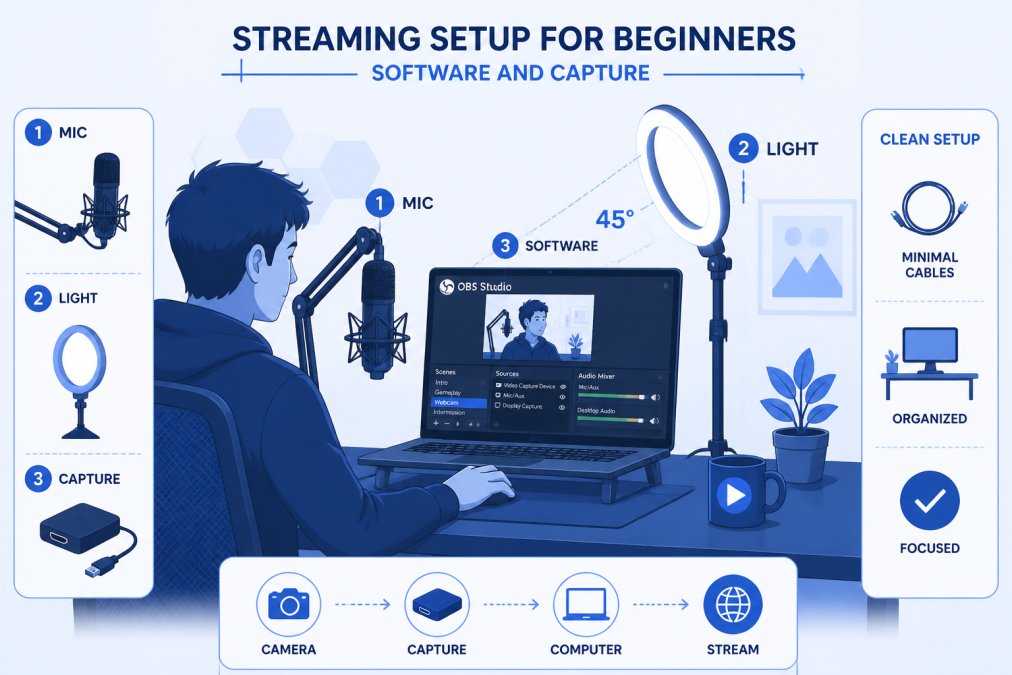
Streaming Setup for Beginners: Software and Capture
OBS Studio is the industry standard for solo streamers, free, powerful, and works on Windows, macOS, and Linux.
OBS Studio Basics for Solo Streamers
OBS captures your screen, webcam, and microphone, encodes them, and broadcasts to your platform (Twitch, YouTube, TikTok, etc.).
A scene is a collection of sources (video, audio, images, text) arranged on your canvas. Most solo streamers start with a simple scene: webcam feed or game window as primary video, USB microphone as audio input, and maybe a static image with your name and social handles.
Sources are individual elements: webcam feed, microphone, browser window showing chat, images, video clips, or text. Each can be positioned, resized, and layered.
The audio mixer shows all audio sources and lets you adjust volume levels. Set your microphone input to peak around -6 to -3 dB during normal speech, leaving headroom to prevent distortion.
Output settings determine stream quality. At 1080p and 60 fps, 6,000 kbps produces high quality. At 1080p and 30 fps, 4,500 kbps is sufficient. Your upload speed should be at least 1.5 times your bitrate.
Do You Need a Capture Card?
A capture card captures video and audio from external sources (gaming console, DSLR) and sends it to your streaming PC. For PC gaming, you don't need one, OBS captures your game window directly. For console gaming, a capture card bridges the gap, letting you play on your TV while streaming.
Budget capture cards like the Elgato HD60 S+ handle 1080p at 60 fps for around $150. If you're starting with PC gaming or talking-head streams, skip the capture card. For console gaming, budget for one.
Webcam and Video Capture Without Breaking the Bank
Your video source depends on content type. For talking-head streams, a webcam is sufficient. For gameplay, capture your game window or console output.
The Logitech C920s Pro HD Webcam delivers 1080p at 30 fps with autofocus and automatic light correction at $69.99. The 78-degree field of view shows your upper body without distortion. The privacy shutter is a nice security feature. The tradeoff: 30 fps is acceptable but not ideal for fast-paced content.
If you own a smartphone or DSLR, you can use it as your camera source. Smartphones connected via USB or HDMI adapters can feed into OBS. DSLRs require a capture card but deliver superior image quality. For beginners, a basic webcam is practical, no extra hardware, no learning curve.
Internet Connection, Bandwidth, and Bitrate Essentials
Your internet connection is your stream's foundation. Upload speed matters for streaming, not download speed. Your upload speed should be at least 1.5 times your target bitrate. If streaming at 4,500 kbps, you need at least 6.75 Mbps upload.
Bitrate determines video quality. At 1080p and 60 fps, 6,000 kbps produces excellent quality. At 1080p and 30 fps, 4,500 kbps is solid. At 720p and 30 fps, 3,500 kbps is acceptable. If upload speed is limited, stream at 720p or lower bitrate rather than dropping to 30 fps at 1080p, viewers prefer smooth motion over resolution.
Latency is the delay between your screen and viewers' screens. Platform latency ranges from 5-60 seconds. Encoder latency should be under 1 second. Network latency is usually under 50 milliseconds. Total latency of 10-15 seconds is normal.
Frame drops occur when your encoder can't keep up or your network is unstable. Monitor encoder statistics in OBS; if you see frame drops, lower bitrate or resolution.
Cable Management and Power Consumption on a Budget
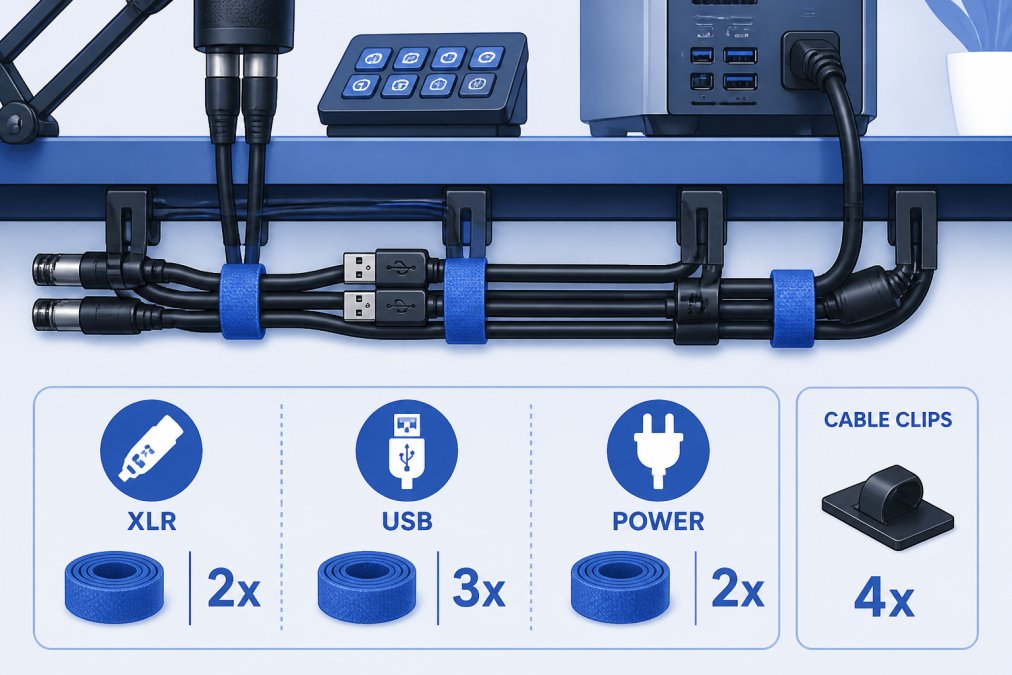
A cluttered desk with cables looks unprofessional on camera. Group cables by function: power cables to one side, audio cables to another, video cables to a third. Use cable ties, clips, or adhesive sleeves to bundle them. Route cables behind your monitor where they're out of frame.
Most streaming setups draw 300-500 watts, well within standard outlet capacity (1,500 watts). A single power strip with on/off switch lets you kill everything at once.
LED lighting runs cool. Position lights to avoid overheating your microphone or camera. In small rooms with limited ventilation, poor heat management can degrade audio quality or damage equipment.
Launching a stream doesn't require a warehouse of equipment. The fundamentals, a quality USB microphone, basic lighting, and stable internet, cost less than most think. Perfect Take Gear specializes in curated creator gear designed to help you build a professional studio in any space. Whether starting your first YouTube video or upgrading your Twitch setup, our selection of affordable microphones, lighting solutions, and streaming accessories gives you the tools to elevate production value without breaking the bank. Start with essentials, test your content, and upgrade strategically based on audience response. That's how solo streamers build sustainable, growing channels.
Frequently Asked Questions
What is the absolute minimum equipment needed to start streaming?
At minimum, you need a computer with internet, a microphone, and lighting. A USB condenser microphone like the FIFINE K669B ($30.99) or Rode NT-USB Mini ($99) handles audio capture. For lighting, a single dimmable ring light provides even illumination. Many solo streamers skip expensive capture cards initially and use OBS Studio (free) to stream directly from their PC. A webcam or your computer's built-in camera works for video. This bare-bones setup costs under $200 and produces watchable content while you learn.
Is a dedicated microphone necessary for new streamers?
Yes, a dedicated microphone significantly improves your stream quality. Built-in laptop or webcam microphones pick up keyboard noise, background hum, and lack clarity. A budget USB condenser microphone with a cardioid pattern isolates your voice and reduces ambient sound. The best budget streaming microphone options start around $30 and deliver professional-sounding audio. Viewers tolerate lower video quality but drop streams with poor audio, making a dedicated microphone one of your highest-ROI purchases.
Do I need a capture card for a single-PC streaming setup?
No, most solo streamers starting out don't need a capture card. OBS Studio runs directly on your PC and streams to Twitch, YouTube, or other platforms without hardware capture. Capture cards become relevant when you're streaming console gameplay (PlayStation, Xbox) or want to separate your streaming computer from your gaming PC to reduce frame drops and latency. For software-only setups, game streaming from your PC, webcam-only content, or screen sharing, OBS Studio alone is sufficient and costs nothing.
How can I improve my stream quality without spending a fortune?
Focus on audio and lighting first, they have the biggest impact on perceived quality. Invest in a budget USB microphone with gain control and a cardioid pattern to capture clear voice. Add a single dimmable ring light or key light to eliminate harsh shadows and improve your on-camera appearance. Optimize your room acoustics by hanging blankets or curtains to reduce echo and improve audio. In OBS Studio, set your bitrate to match your upload speed (usually 2500-4500 kbps for 1080p30fps) and enable hardware acceleration to reduce frame drops. These changes cost under $300 and dramatically improve production value.
What lighting setup is best for small streaming spaces?
For small rooms, a single dimmable ring light or key light is ideal. Ring lights (like the NEEWER 18-inch model) mount directly to your desk and provide soft, shadow-free illumination from behind your camera. Key lights (like the Elgato Key Light Air) clamp to your monitor or desk edge and take up minimal space. Both offer adjustable color temperature (3200K-5600K range) to match your room's natural light. Avoid multiple lights in tight spaces, they create harsh shadows and heat buildup. A single 18-20 inch light positioned slightly above and to the side of your camera is enough for professional-looking streams in compact areas.
This article was written using GrandRanker