

How to Film Professional Videos Alone: Step-by-Step
Table of Contents
- Essential Gear for Solo Filming
- How to Set Up Lighting for Self-Filming
- Solo Video Production Workflow: From Setup to Recording
- Tips for Framing Shots Alone and Monitoring Your Video
Last Updated: August 14, 2026
Essential Gear for Solo Filming
Learning to film professional videos alone requires three core tools: a stable camera, a reliable tripod, and proper audio capture. Without these elements, even strong technique won't produce professional results.
A quality camera serves as your foundation. Smartphones paired with stabilization tools like the DJI Osmo Mobile 8P offer excellent value for creators starting out, featuring 3-axis stabilization and AI tracking that keeps your phone centered and smooth. For dedicated camera work, compact vlogging cameras like the DJI Osmo Pocket 3 deliver cinematic quality with built-in gimbal stabilization and 4K/120fps capability. When building your solo setup, Cameras, Lighting & Audio Equipment form the backbone of professional production.


A tripod rated for your camera's weight is non-negotiable. Look for models with fluid pan-tilt heads that allow smooth movements, it becomes your second camera operator, holding framing steady while you perform or speak.
Audio equipment separates amateur content from professional work. A USB microphone captures clean dialogue without background noise. Perfect Take Gear stocks USB microphones designed for creators, offering plug-and-play simplicity for recording directly into your computer or camera.
How to Set Up Lighting for Self-Filming
Lighting transforms how your audience perceives your content quality. The most effective solo setup uses three-point lighting: key light, fill light, and background separation. Affordable LED panels work exceptionally well.
Position your key light at a 45-degree angle to your face, roughly 3-4 feet away, with a softbox to diffuse light and prevent glare. Add a fill light on the opposite side at lower intensity to soften shadows without eliminating them. Background lighting creates visual depth, making your video feel more cinematic.
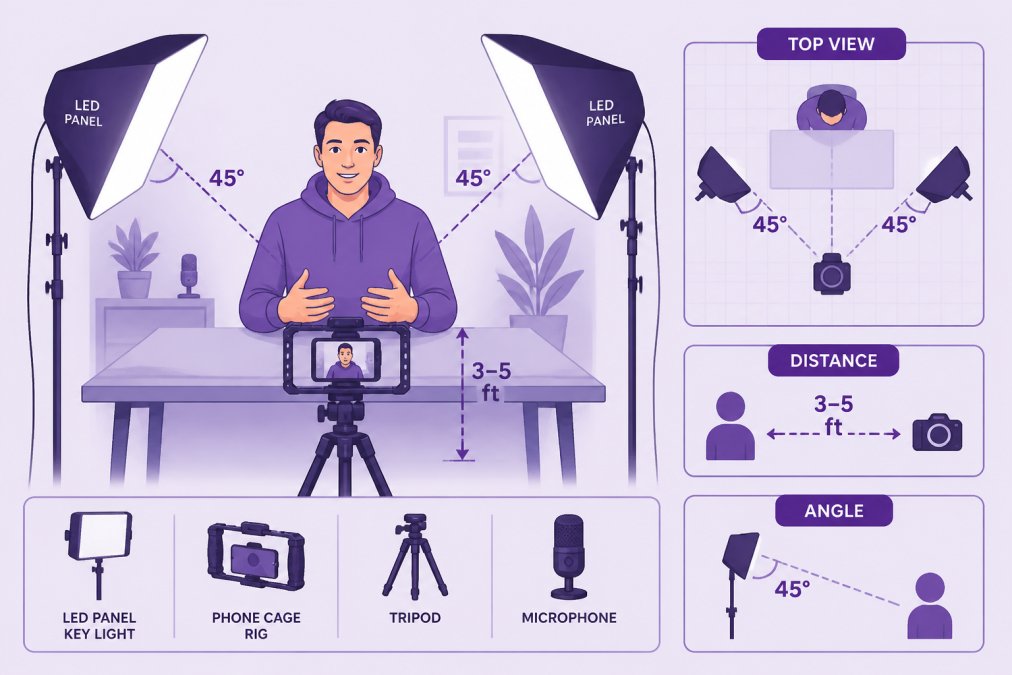
Set your camera's white balance manually rather than using automatic mode. Automatic white balance shifts during recording if shadows move, creating visible color changes that distract viewers.
Solo Video Production Workflow: From Setup to Recording
Establishing a repeatable workflow prevents mistakes and speeds up production. Start by creating a shot list: write down every camera angle, framing, and shot type you need. This prevents discovering missing footage during post-production.
Set up your camera and tripod in the planned position. Frame your shot, check focus, and verify exposure. Enable autofocus and exposure lock so you can move freely without the image going soft or dark.
Position your audio equipment, a lavalier microphone for dialogue or a USB microphone on a boom arm for desk-based content. During recording, monitor your video on an external monitor if possible. The DJI Osmo Mobile 8P includes built-in monitoring, letting you see your shot composition while recording.
Record each shot multiple times. By take three or four, your performance settles and dialogue flows smoothly. After recording, immediately review footage on your camera to catch focus, audio, or framing issues on-site.
Tips for Framing Shots Alone and Monitoring Your Video
The rule of thirds provides a framing foundation: divide your frame into nine equal sections and position your eyes on the upper horizontal line, with your body slightly off-center. Leave headroom above your head, roughly one-quarter of the frame, to feel balanced.
Depth of field separates you from your background. Open your aperture wide for a shallow depth of field that blurs the background while keeping your face sharp. Smartphones with portrait mode simulate this effect effectively.
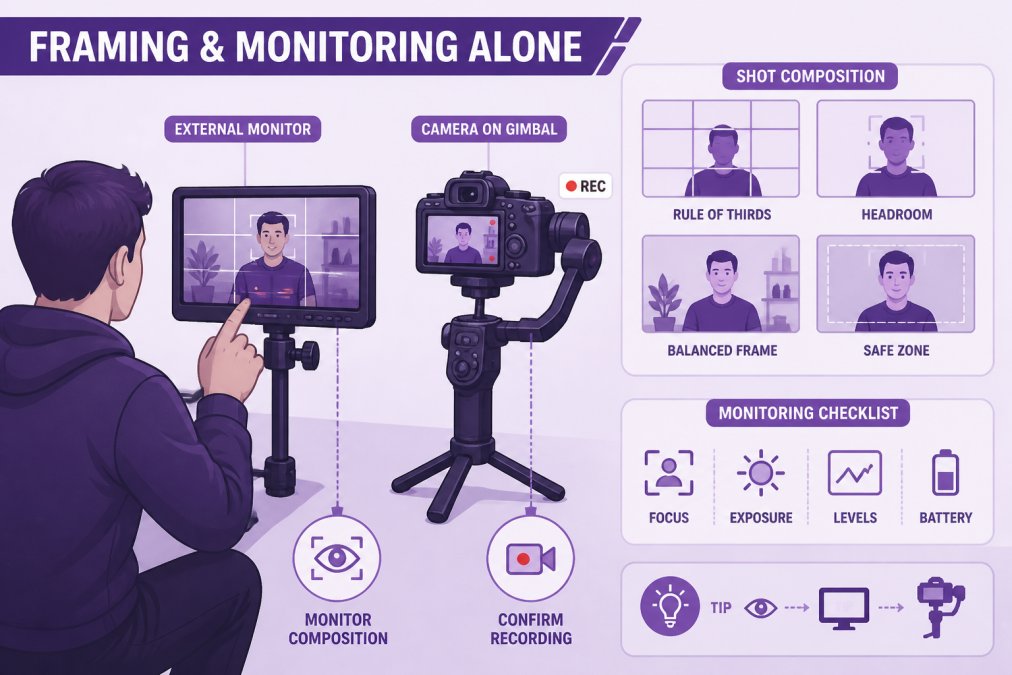
Live monitoring prevents framing mistakes. Use your camera's LCD screen or external monitor to see exactly what the camera captures. Vary your framing throughout your video: start with a wide shot, move to medium shots for dialogue, and use close-ups for emphasis.
The Hohem V3 smartphone gimbal includes AI face tracking that keeps you centered automatically, letting you focus on performance rather than camera positioning. For manual control, set focus manually on your face and lock it, you remain in focus throughout the shot regardless of minor movements.

Filming professional videos alone becomes manageable once you establish a repeatable system. The right gear, a stabilized camera, proper lighting, and clean audio, handles the technical foundation. A workflow of planning, setting up, recording multiple takes, and monitoring your output ensures you capture professional-quality footage.
Perfect Take Gear provides the Content Creator Gear & Equipment creators need to build professional setups without expensive cinema gear. From stabilized gimbals with AI tracking to affordable LED lighting and quality microphones, the tools are accessible. The skill comes from understanding how to position them intentionally. Start with essential gear, master your workflow, and your solo videos will compete with professionally produced content.
Frequently Asked Questions
What equipment do I need to film professional videos by myself?
Start with a camera or smartphone, a tripod or gimbal for stabilization, a microphone for clean audio, and key lighting. For solo filming, automated focus and tracking technology eliminates the need for a second operator. The DJI Osmo Pocket 3 combines a built-in gimbal and 4K/120fps capability, while smartphone gimbals like the DJI Osmo Mobile 8P add AI tracking for hands-free framing. Add a USB microphone for consistent audio quality and a basic key light to control production value.
How do I keep myself in focus when filming alone?
Modern gimbals and cameras offer automated focus and face-tracking features that lock onto you automatically. Set your camera to continuous autofocus or use manual focus with focus peaking if your camera supports it. AI tracking technology in devices like the Hohem V3 gimbal follows your movement without manual adjustment. Test your focus before recording by moving through your scene to ensure the camera maintains sharp focus on your face and body.
How can I ensure high-quality audio when filming solo?
Audio is critical for professional video. Use an external microphone rather than relying on built-in camera audio. A USB microphone positioned close to your mouth captures clear dialogue with minimal background noise. Lavalier microphones clip to your clothing for hands-free recording. Record in a quiet space and monitor audio levels in real-time. Test your audio source before shooting to catch issues early and avoid re-recording entire scenes due to poor sound quality.
What's the best way to monitor my video while recording alone?
Use an external monitor mounted on your tripod or rig to see your framing and composition in real-time. This lets you check focus, exposure, and framing without stopping the camera. Many gimbals and stabilizers include built-in remote monitoring via smartphone apps. Position the monitor where you can glance at it between takes. This setup prevents the common mistake of discovering framing or focus issues only during post-production editing.
This article was written using GrandRanker