

Choosing the Right Light Stands for Streaming
Table of Contents
- Why Light Stands Matter for Streaming Quality
- Best Light Stands for Streaming: Types and Load Capacity
- Desk Light Stands for Streaming: Compact Setups
- Clamp-On Light Stands for Streaming: Space-Saving Options
- How to Position Lights for Streaming: Placement and Angles
- Stand Stability, Safety, and Cable Management
- Stand Compatibility and Portability
- Conclusion
- Frequently Asked Questions
Last Updated: October 15, 2026
Why Light Stands Matter for Streaming Quality
Choosing the right light stands for streaming is one of the most overlooked decisions creators make. Most streamers focus on the lights themselves, the brightness, color temperature, and features. But the stand that holds your light determines everything: stability, positioning flexibility, and whether your entire setup stays upright during a four-hour stream.
A wobbly stand creates more problems than just visual instability. It limits where you can place lights, forces awkward angles, and introduces risk every time you adjust your setup. The right light stands for streaming solve this by providing secure height adjustment, reliable load capacity, and compatibility with your existing gear.
The foundation matters as much as what sits on top of it. This guide breaks down how to choose light stands that actually support your streaming setup, not work against it.
Best Light Stands for Streaming: Types and Load Capacity
Different streaming scenarios demand different stand types. Understanding the load capacity and height range of each option helps you avoid buying stands that can't hold your lights or reach the angles you need.
Tripod Stands: Stability and Height Range
Tripod stands are the workhorse of streaming setups. They extend from low desk height to well above shoulder height, making them versatile for key lights, fill lights, and backlights.
Most quality tripod stands extend from around 1.5 meters to 2.8 meters, giving you flexibility to position lights at eye level, above the camera, or high enough to backlight a subject.
The SH Studio Tripod Stand with Wheels & Boom Option offers this range at an accessible price point. It extends from 1.5m to 2.8m and holds up to 10kg, making it suitable for standard streaming fixtures.

For creators working in tighter spaces or needing portability, tripod stands fold compactly. The folded length of around 1.5 meters fits easily in closets or behind furniture when not in use. Setup takes minutes: extend the legs, lock the center column, and mount your light.
C-Stands: Professional-Grade Control
C-stands (century stands) offer precision positioning that tripods can't match. They're built for professional film and TV production, with a center column that can extend, tilt, and rotate independently. A magic leg, the articulating arm at the base, lets you position the stand at angles tripods simply can't achieve.
C-stands hold significantly more weight than tripod stands. The SH 320cm C-Stand Magic Leg with 3-Wheel Base supports up to 20kg and extends to 3.2 meters. The 3-wheel rolling base adds stability and mobility on studio floors.
The trade-off is complexity and footprint. C-stands require more setup time and take up more floor space than tripods. They're best for permanent or semi-permanent setups where precision positioning justifies the extra effort. For streamers with dedicated studio spaces and multiple light setups, a C-stand provides control that tripods simply can't offer.
Desk Light Stands for Streaming: Compact Setups
Not every streamer has room for floor stands. Desk light stands mount directly to your streaming desk or table, freeing up floor space and creating a cleaner setup. These compact options work well for ring lights, small LED panels, and supplementary fixtures.
Desk clamps are the most common approach. They grip the edge of your desk and hold a small arm that extends upward.
The advantage of desk mounting is simplicity. Setup takes seconds: clamp to your desk, adjust the arm angle, and mount your light. Breakdown is equally fast, making desk stands ideal for creators who stream from home offices or shared spaces.
The SH Studio Tripod Stand with Wheels & Boom Option can function as a desk-adjacent solution when positioned close to your streaming area.
Clamp-On Light Stands for Streaming: Space-Saving Options
Clamp-on light stands attach to existing structures, shelves, curtain rods, door frames, or studio rigs. They eliminate the need for floor or desk space entirely, making them invaluable for cramped streaming environments.
Load capacity varies widely depending on the clamp design and what you're clamping to. Most clamp-on stands hold 3kg to 8kg.
Clamp-on stands work best when you have a solid mounting point. Shelving units, permanent fixtures, or professional rig systems provide reliable anchors. Temporary mounting points like curtain rods or door frames work in a pinch but introduce risk if not properly secured.
The advantage is space efficiency. Clamp-on stands let you build a three-light setup in a room where floor stands would create an obstacle course. They're popular with streamers in apartments, dorm rooms, and shared spaces where floor real estate is premium.
| Stand Type | Height Range | Load Capacity | Best For | Footprint |
|---|---|---|---|---|
| Tripod | 1.5m-2.8m | 10kg | Flexible positioning, portable setups | Medium |
| C-Stand | Up to 3.2m | 20kg | Precision angles, permanent studios | Large |
| Desk Clamp | Desk height + arm reach | 2kg-5kg | Compact desks, ring lights | Minimal |
| Clamp-On | Varies by mount point | 3kg-8kg | Space-constrained rooms | None (wall/shelf mounted) |
How to Position Lights for Streaming: Placement and Angles
Choosing the right light stands for streaming only solves half the problem. How you position those stands determines lighting quality. Professional-looking streams use a three-light setup: key light, fill light, and backlight. Each serves a specific purpose and requires thoughtful placement.
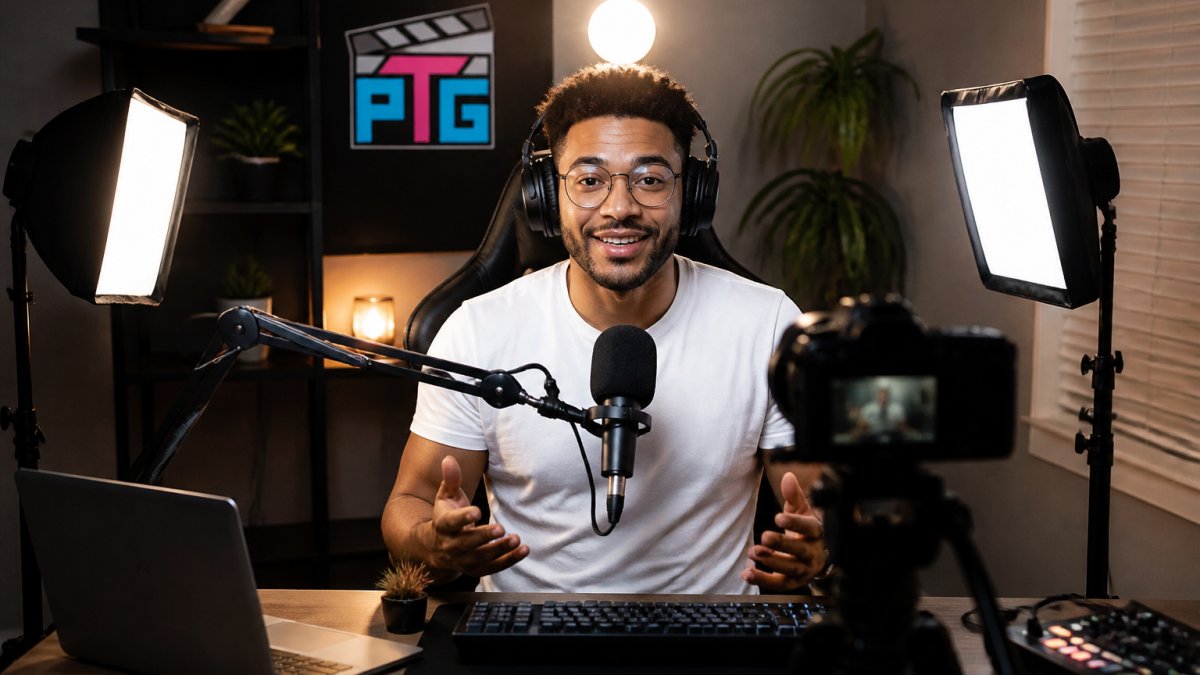
Key Light Positioning
The key light is your primary light source. It should be positioned 45 degrees to one side of your camera, roughly at eye level or slightly above. This angle creates dimension on your face without harsh shadows. Too far to the side and half your face disappears into shadow.
Distance matters as much as angle. Key lights positioned 3 to 6 feet from your face provide soft, flattering illumination without overexposure. Closer positioning intensifies the light but risks blown-out highlights on your forehead and nose.
SH Folding Studio Light Stand - 2.8m →
Adjust your stand height so the light points slightly downward at your face. This mimics natural light from overhead and is universally flattering. Horizontal positioning feels unnatural and creates odd shadows. A tripod stand that adjusts from 1.5m to 2.8m gives you the flexibility to dial in this angle precisely.
Fill Light and Shadow Reduction
The fill light sits on the opposite side of your key light, roughly at the same height or slightly lower. Its job is reducing shadows on the side of your face away from the key light, not eliminating them entirely. Complete shadow elimination looks flat and lifeless on camera.
Position your fill light at lower intensity than the key light, typically 50% to 70% of the key's brightness. This maintains dimension while softening harsh shadows. If your key light is at full brightness, dial the fill light back. The goal is subtle, not obvious.
Distance from the subject is less critical for fill lights. They can be further away than key lights because they're providing supplementary illumination, not primary light. A desk clamp or compact stand works fine for fill lights, freeing up floor space for other equipment.
Backlighting for Subject Separation
The backlight sits behind you, pointing toward the camera. It creates a rim of light around your head and shoulders, separating you visually from your background. This is what gives professional streams that polished, three-dimensional look.
Backlight positioning is forgiving. It can be high, low, or off to one side, as long as it's behind you and not directly visible in your camera frame. Many streamers position backlights on shelves or clamp them to existing structures to save floor space. The light itself should be out of frame but its effect on your subject should be visible.
Intensity is lower than key and fill lights. Backlighting at 30% to 50% of your key light's brightness is typically ideal. Too intense and you get a distracting halo. Too dim and the separation effect disappears.
Stand Stability, Safety, and Cable Management
A light stand's stability depends on three factors: base design, center column rigidity, and load distribution. Tripod stands with a wide base angle are more stable than stands with narrow legs. A heavier stand resists tipping better than a lightweight one, but portability suffers.

Always verify the load capacity before mounting a fixture. Exceeding rated capacity stresses the locking mechanism and can cause sudden collapse. A 10kg stand holding a 12kg light is a safety risk and a guarantee of equipment damage.
Cable management prevents trips and keeps your setup professional-looking. Run cables down the stand's center column where possible, securing them with velcro straps or cable clips. Keep cables away from high-traffic areas and off the floor. Tangled cables are a tripping hazard and look messy on camera if visible in your frame.
For C-stands, the magic leg should be positioned to counterbalance the weight of the mounted fixture. Extending the magic leg away from the mounted fixture improves stability. Check the position before mounting anything and adjust if the stand feels wobbly.
Stand Compatibility and Portability
Light stands use standard mounting hardware, but compatibility isn't guaranteed. Most stands use a 5/8-inch stud or 1/4-inch female thread at the top. Verify your light fixture matches before purchasing. Adapters exist for mismatched hardware, but they add cost and complexity.
Portability matters if you stream from different locations or need to store your setup between sessions. Folding stands compact to 1.5 meters or less, fitting in closets or behind furniture. C-stands don't fold as compactly and require more storage space.
If you're building a permanent studio, storage and portability matter less. If you're streaming from a bedroom that doubles as a guest room, a compact tripod stand that breaks down quickly becomes essential.
The SH Folding Studio Light Stand - 2.8m offers excellent portability at an accessible price. It folds to 1.5 meters and weighs 2.5kg, making it practical for creators who move their setup frequently.
Conclusion
Choosing the right light stands for streaming determines whether your setup supports your creative vision or works against it. Stability, height range, and load capacity matter more than brand names or aesthetic appeal. A reliable tripod stand that holds your lights securely and adjusts to the angles you need will serve you better than an expensive stand that wobbles or limits your positioning options.
Perfect Take Gear offers streaming stands designed for creators who need reliability without complexity. The SH Folding Studio Light Stand and SH Studio Tripod Stand with Wheels & Boom Option provide the stability, adjustability, and load capacity that professional streaming demands. Start with a quality foundation, position your lights thoughtfully, and your streaming setup will look and feel professional from day one.
Frequently Asked Questions
How tall should a light stand be for streaming?
Most streaming setups benefit from stands that extend 5 to 9 feet tall, positioning your key light at or slightly above shoulder height. Stands like the SH Folding Studio Light Stand extend from 4.9 feet to 9.2 feet, giving you flexibility to adjust based on your seated position and camera angle. Higher stands create more flattering angles and reduce harsh shadows on your face.
What's the difference between tripod stands and C-stands for streaming?
Tripod stands are lightweight, portable, and ideal for beginners, they fold compactly and work well for LED panels and ring lights. C-stands are heavier, more stable, and offer greater reach with adjustable arms; they're better for professional setups handling larger fixtures. The SH C-Stand Magic Leg reaches 10.5 feet with a 44-pound load capacity.
Do I need two light stands for streaming?
Two stands create a three-point lighting setup: one for your key light, one for fill light to reduce shadows. A single stand works for beginners, but two stands dramatically improve image quality by softening facial shadows and adding depth. Many streamers start with one stand and add a second as they upgrade their setup.
Are clamp-on light stands better than floor stands for a small desk?
Clamp-on stands save desk space and keep your floor clear, ideal for tight setups. Floor stands offer more stability and height flexibility. For small desks, clamp-on stands work well if your desk is sturdy enough; for maximum stability and reach, a compact tripod stand positioned beside your desk often provides better results without compromising your workspace.