

Cheap Studio Desk Ideas for Home Recording
Table of Contents
- Why a Dedicated Studio Desk Matters for Home Recording
- Budget Studio Desk Options Under $200
- DIY Music Production Desk Plans
- Studio Desk Cable Management Tips
- Small Space Home Studio Layout
- Ergonomics and Posture for Music Producers
- Essential Desk Accessories for Recording
- Studio Desk vs. Standard Office Desk
- Frequently Asked Questions
Last Updated: September 25, 2026
Why a Dedicated Studio Desk Matters for Home Recording
A cheap studio desk isn't just about saving money. It's about building a workspace that actually supports your recording work without eating up your entire budget or your room's square footage. The difference between recording at a random table and recording at a proper studio desk shows up immediately in your workflow, your posture, and honestly, in how long you can work before your back starts complaining.
When you're producing music, recording vocals, or streaming content, your desk becomes mission control. It needs to hold your audio interface, studio monitors, microphone, keyboard, and ideally some breathing room for your hands to move. A standard office desk might look fine, but it's usually too deep, lacks cable management, and doesn't account for the specific needs of recording equipment. A cheap studio desk solves these problems without forcing you to spend thousands.
Perfect Take Gear provides creator gear, gaming accessories, cameras, lighting, audio equipment, studio essentials, and innovative tech designed to help creators, gamers, streamers, and everyday users build better setups. The key is knowing what features matter and which ones you can skip. Budget desks have come a long way, and today's options can deliver real functionality without the premium price tag.
Budget Studio Desk Options Under $200
The sweet spot for affordable studio desks sits between $150 and $200. In this range, you get solid construction, enough surface area for your gear, and features like cable management that would have cost double a few years ago.
Corner Desks for Small Space Optimization
Corner desks are the space-saving champions for home studios. They fit into unused corner real estate and give you an L-shaped working surface that actually feels spacious without dominating the room.
The EnHomee Corner Computer Desk with LED Lights runs $157.99 and delivers surprising functionality for the price. The 35.43-inch square desktop is big enough for two or three monitors and desk accessories. The built-in power strip with 2 AC outlets, 2 USB ports, and 2 Type-C ports means you're not hunting for wall outlets behind your desk. LED ambient lighting with 20 colors and 21 modes sounds like a gimmick until you realize how much it improves your workspace atmosphere during long sessions.

The reinforced steel frame supports up to 90 lbs. Two fabric drawers and a two-layer top shelf keep cables, headphones, and reference materials within arm's reach. Numbered components and clear instructions make tool-free assembly quick.
L-Shaped Desks for Expandable Workstations
L-shaped desks give you more continuous surface area than corner desks and work well if you're planning to expand your setup later. They're the choice when you need room to grow without replacing your desk entirely.
The JHK 67-Inch L-Shaped Gaming Desk with LED at $171.99 flips between left and right configurations, so you can adapt it to your room layout. Better yet, it converts into a straight 94.5-inch desk if you want to reconfigure later. The app-controlled RGB LED lighting connects via app for control over millions of RGB colors, lighting effects, automated timers, and brightness, or use the manual button for quick adjustments. A built-in storage shelf and slide-out keyboard tray keep your main workspace clear, with an additional side pocket for frequently used items.

A built-in storage shelf and slide-out keyboard tray keep your main workspace clear, with an additional side pocket for frequently used items. The side pocket stores frequently used items like headphones or a notepad without cluttering your workspace.
The desk combines a strong metal frame with a high-quality MDF desktop, and adjustable leveling feet keep it stable on any floor.
DIY Music Production Desk Plans
Not everyone wants to buy a pre-made desk. Building your own cheap studio desk from reclaimed materials or IKEA components gives you total control over size, height, and layout. The upfront effort pays off with a workspace customized exactly to your needs.
Building From Reclaimed Materials
Reclaimed wood desks have character and durability. Old doors, barn wood, or reclaimed beams become desktop surfaces that look great and handle studio equipment without flinching. The cost comes down dramatically if you source materials locally or from salvage yards.
Start with a solid base. Heavy-duty steel legs or industrial-style metal frames support the weight of studio monitors and audio interfaces better than typical desk frames. Aim for a desktop depth of at least 24 inches to accommodate studio monitors that sit behind your keyboard and mouse. Width depends on your room, but 48 to 60 inches gives you enough space without overwhelming a small bedroom.
Cable management matters more with a DIY build. Plan for cable routing before assembly. Drill holes in the desktop and install grommets, or route cables through the underside using clips and channels. A messy cable situation turns into a workflow nightmare fast.
IKEA Hacks and Budget Assembly
IKEA components offer cheap studio desk building blocks. The Bekant, Hilver, or Idasen desks serve as solid foundations, and accessories like drawer units and shelves expand functionality without breaking the budget.
Stack two IKEA drawer units under a solid wood or engineered wood desktop to create a sturdy base. This approach costs less than a comparable finished desk and gives you storage where you need it. Add a monitor arm to free up more surface area, and suddenly your cheap IKEA setup rivals desks costing three times as much.
The real hack is combining IKEA's modular approach with targeted upgrades. Buy the basic desk structure from IKEA, then invest in quality cable management, monitor arms, and acoustic treatment elsewhere. This hybrid approach delivers professional results without the professional price tag.
Studio Desk Cable Management Tips
Cable management separates a functional workspace from a chaotic one. Tangled cables under your desk don't just look bad, they create workflow friction when you need to swap gear or troubleshoot connections.
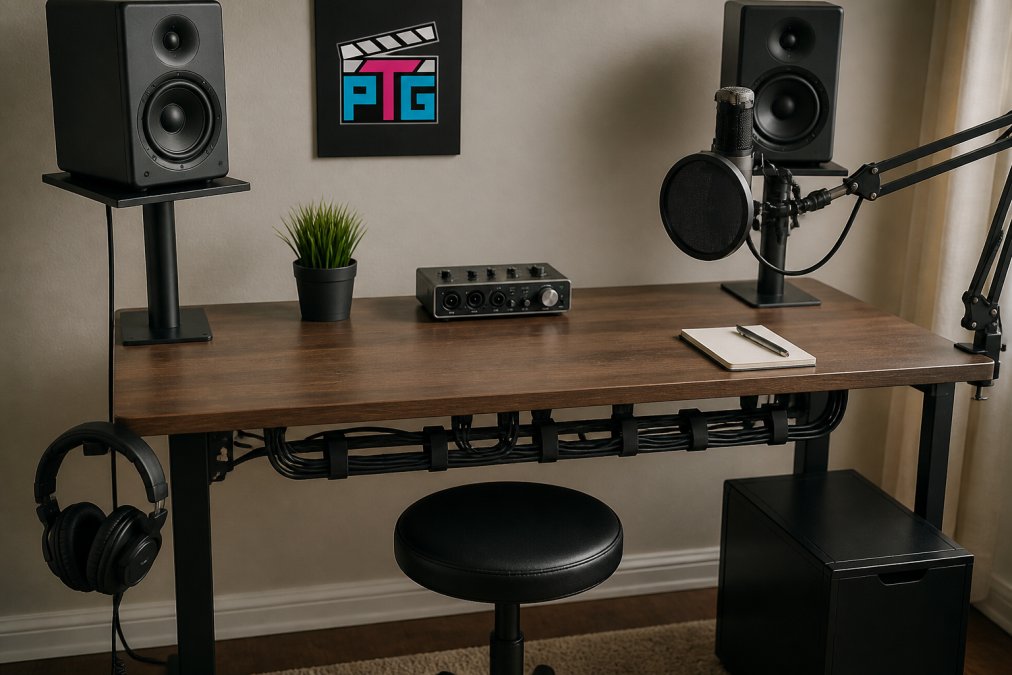
Start with the right tools. Cable clips, velcro ties, and cable sleeves cost almost nothing but transform your setup's organization. Route cables behind your desk and along the underside using clips spaced every 12 inches. This keeps them out of sight and prevents them from catching on chair wheels or getting stepped on.
The Carbon Steel Two-Tier Desk Shelf with Clamping Mount at $43.99 adds overhead storage without eating floor space.

Small Space Home Studio Layout
Small spaces demand smart layout decisions. Your cheap studio desk should be positioned to maximize both functionality and the feeling of space.
Ergonomics and Posture for Music Producers
Hours at your desk add up fast. Poor posture creates back pain, neck strain, and repetitive stress injuries that sideline creators. A cheap studio desk is only valuable if it supports healthy positioning.
Essential Desk Accessories for Recording
The right accessories transform a basic cheap studio desk into a professional workspace. These aren't luxuries, they're tools that directly improve your workflow and recording quality. When you're sourcing Cameras, Lighting & Audio Equipment and Content Creator Gear & Equipment, you'll find many of these accessories designed to work seamlessly with your desk setup.
Studio Desk vs. Standard Office Desk
The differences matter more than the price gap suggests. A standard office desk optimizes for administrative work. A studio desk optimizes for equipment that generates heat, requires specific positioning, and demands cable management.
| Feature | Studio Desk | Office Desk |
|---|---|---|
| Cable management | Built-in grommets, routing channels | Usually none |
| Surface area | Optimized for monitors + gear | Optimized for keyboard + papers |
| Power outlets | Integrated power strips common | Rarely included |
| Monitor positioning | Supports elevated or articulated mounts | Limited mounting options |
| Acoustic properties | Designed to minimize vibration | Transmits vibration to monitors |
| Depth | 24-30 inches for proper monitor distance | 18-24 inches, forces monitors too close |
Frequently Asked Questions
What is the best affordable studio desk for music production?
The best affordable cheap studio desk balances surface area, cable management, and stability. Corner desks like the EnHomee ($157.99) offer compact footprints with integrated power strips and storage, ideal for small spaces. L-shaped options like the JHK 67-Inch ($171.99) give you flexibility to expand into a 94.5-inch straight configuration. For two-person setups, the Satifur 93-Inch ($155.99) includes monitor stands that reduce neck strain, critical for long recording sessions.
Can you use a standard office desk for music production?
A standard office desk can work, but studio-specific desks offer advantages that matter. Studio desks typically include cable routing, built-in power strips to reduce clutter, and monitor stands or shelf space for speaker placement. Standard office desks lack these features, forcing you to add accessories separately. If you already own an office desk, add a carbon steel clamp-on shelf ($43.99) for monitor elevation and a dual monitor arm ($89.99) to improve your ergonomic setup.
How do I organize cables on a cheap studio desk?
Studio desk cable management starts with the desk itself. Desks with built-in power strips and cable routing channels keep wires contained. Use cable ties or sleeves to bundle runs along the back frame. A carbon steel two-tier clamp-on shelf can hide cables behind the desktop while providing secondary storage. Route audio interface, monitor, and microphone cables separately, don't bunch them together, as this can introduce noise into your recordings.
What's the minimum surface area needed for home recording?
You need at least 24 by 18 inches of clear workspace for your audio interface, microphone, and monitor controls. Corner desks with 35.43-inch surfaces provide ample room for two or three monitors plus recording gear. If space is tight, a 67-inch L-shaped desk gives you flexibility to position your main recording equipment on one side and reference monitors on another, keeping everything within arm's reach without cramping your workflow.
Building a home recording setup doesn't require a premium budget. A cheap studio desk from Perfect Take Gear provides the foundation for serious work. The JHK L-shaped desk at $171.99 or the EnHomee corner desk at $157.99 deliver features that support professional workflows without the professional price tag. Add a monitor arm, cable management tools, and acoustic treatment, and you've built a workspace that rivals setups costing three times as much.