

Affordable Camera Stabilizers for Creators: 2026 Guide
Table of Contents
- What Affordable Camera Stabilizers Actually Do for Creators
- How to Balance a Camera Gimbal: Getting Smooth Footage Right
- Mechanical vs Electronic Camera Stabilizers: Which Fits Your Budget
- Camera Stabilizer Weight Capacity Guide: Match Your Gear
Last Updated: August 12, 2026
What Affordable Camera Stabilizers Actually Do for Creators
A camera stabilizer eliminates shaky footage by using motorized axes or mechanical counterbalancing to keep your camera level and smooth, regardless of how your hands move. For creators shooting on phones, mirrorless cameras, or action cameras, this single piece of equipment transforms amateur-looking content into professional-grade video that holds viewer attention.
Shaky handheld shots cause viewer fatigue, reduce watch time, and signal low production value, even if your lighting and audio are perfect. Stabilizers solve this without requiring expensive camera rigs, professional crews, or studio setups. A three-axis gimbal handles pan, tilt, and roll motion simultaneously, keeping your subject centered and your horizon level while you move.

Perfect Take Gear carries a curated selection of stabilizers designed specifically for creators on budgets. Whether you're filming TikTok videos on your phone, shooting YouTube vlogs with a mirrorless camera, or testing equipment before committing to professional gear, the right stabilizer makes the difference between content that looks polished and content that feels rough. Our Content Creator Gear & Equipment collection includes stabilizers paired with complementary tools to help you build a complete, affordable setup.

How to Balance a Camera Gimbal: Getting Smooth Footage Right
Balancing a camera gimbal correctly is the single most important setup step. A properly balanced gimbal delivers smooth, silent footage and extends battery life. An unbalanced gimbal strains the motors, creates visible jitter, and drains the battery in half the time.
Balance means the camera's weight is distributed evenly across all three axes: pan, tilt, and roll. When balanced, the gimbal should hold your camera steady with minimal motor effort.
The balancing process takes five minutes:
Start with the pan axis (left-right rotation). Loosen the pan clamp slightly and slide your camera forward or backward until it stays level without tipping. Tighten the clamp.
Next, balance the tilt axis (up-down pitch). Loosen the tilt clamp and adjust the camera's position until it remains horizontal without tilting when released.
Finally, balance the roll axis (side-to-side tilt). Loosen the roll clamp and rotate your camera until it sits level.
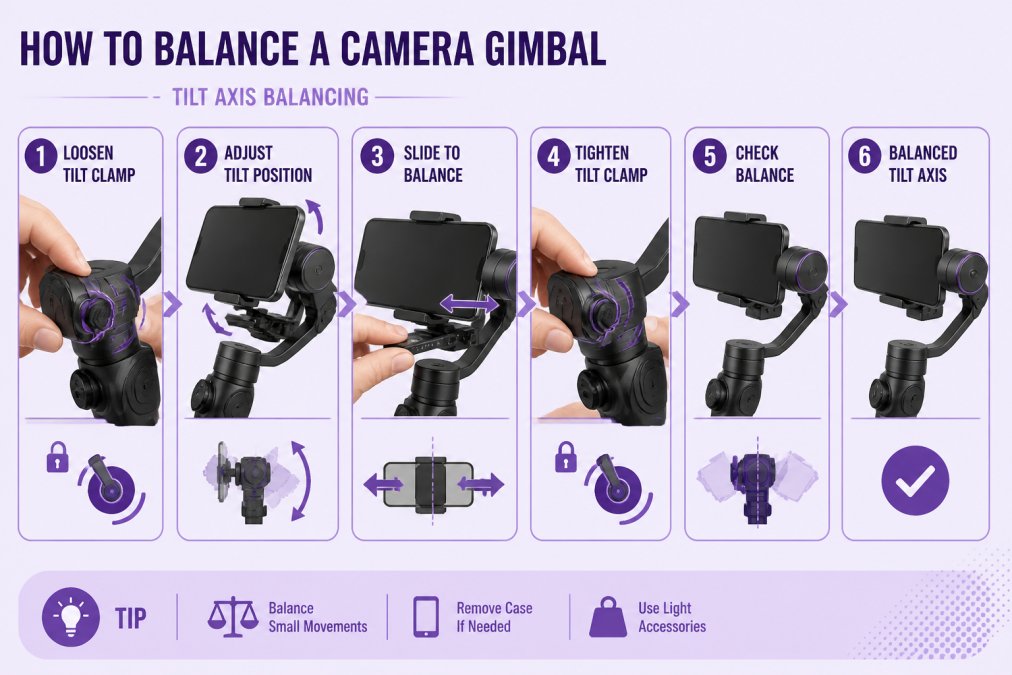
After balancing, test by moving the gimbal in all directions. If you see jitter, recheck each axis. Many creators skip this step and blame the gimbal for poor performance; the gimbal is usually fine, it's just unbalanced.
Mechanical vs Electronic Camera Stabilizers: Which Fits Your Budget
Two stabilization approaches exist: mechanical and electronic.
Mechanical stabilizers use counterweights and pivot points to balance your camera passively. A smartphone cage with handles or a handheld rig relies entirely on weight distribution. No batteries, no motors, no firmware updates. Mechanical stabilizers work indefinitely and excel at slow, cinematic movement and stationary shots. They're ideal for vlogging, walking interviews, and slow tracking shots where you control the pace.
The trade-off: mechanical stabilizers only work if you move smoothly and deliberately. Fast pans, quick direction changes, or jerky handheld movement still show in your footage.
Electronic stabilizers use motorized axes and algorithms to actively counteract movement. A three-axis gimbal detects motion through gyroscopes and accelerometers, then moves the motors to keep your camera level. Electronic stabilizers handle fast movement, quick pans, and dynamic handheld shooting. They also enable features like AI tracking, follow mode, and automated pan-follow.
The trade-off: electronic stabilizers require batteries, regular charging, and occasional firmware updates. They're also heavier and more complex to balance. But they deliver smooth footage even when you're moving fast or shooting unpredictably.
| Stabilizer Type | Best For | Payload | Battery Life |
|---|---|---|---|
| Mechanical cage | Slow, deliberate movement and stationary shots | Up to 5 lbs | N/A (no battery) |
| Electronic smartphone gimbal | Phone vlogging, TikTok, Instagram Reels | 6-14 oz | 12-18 hours |
| Electronic mirrorless gimbal | Professional video, YouTube, cinematic work | 2-4 lbs | 8-12 hours |
Most creators benefit from an electronic stabilizer because modern content demands fast cuts, quick pans, and dynamic movement. If you're starting out and budget is tight, a mechanical phone cage delivers real stabilization and teaches you smooth movement fundamentals.

Camera Stabilizer Weight Capacity Guide: Match Your Gear
Weight capacity (also called payload capacity) determines which cameras your stabilizer can handle. Exceeding the weight limit strains the motors, reduces smoothness, drains battery faster, and can damage the gimbal.
Smartphone gimbals support 6-14 ounces, which covers all modern phones. If you're adding external microphones, lens adapters, or light rigs to your phone, verify the total weight stays under the limit.
Mirrorless camera stabilizers support 2-4.4 pounds. This range covers most mirrorless bodies plus a small lens. A Sony a6700 body (about 1.3 lbs) plus a 24mm lens (about 0.8 lbs) totals roughly 2.1 lbs, well within limits. But add a zoom lens and you may exceed capacity.
Compact handheld rigs and cages (mechanical stabilizers) support 3-5 pounds and are designed for lightweight mirrorless setups.
Exceeding capacity doesn't mean your gimbal will fail immediately. Instead, you'll notice visible jitter, battery draining 30-50% faster than rated, slower response in follow mode, and heat buildup after 30-45 minutes of use.
Always verify payload capacity before purchasing. If your camera setup is close to the limit, choose the next size up to allow room for microphones, lights, or lens changes. When you're ready to add complementary gear like external audio or lighting, our Cameras, Lighting & Audio Equipment selection ensures everything works together seamlessly.
Affordable camera stabilizers have democratized smooth video production. Whether you're shooting on a smartphone, mirrorless camera, or compact camera, stabilized footage is now accessible without spending thousands. The key is matching the stabilizer type and weight capacity to your specific camera and shooting style. Perfect Take Gear offers stabilizers across all price points and camera types, helping creators at every level capture smooth, professional-quality footage that elevates their content production.
Frequently Asked Questions
Are affordable camera stabilizers worth it for beginners?
Yes, especially if you're creating content for TikTok, Instagram, or YouTube. Entry-level gimbals and phone cages deliver smooth footage that looks professional without the learning curve of high-end equipment. A stabilizer under $100 can eliminate shaky handheld video, which is the most common complaint from new creators. Start with what fits your budget, you can upgrade later as your needs grow.
What's the difference between mechanical and electronic camera stabilizers?
Mechanical stabilizers (like phone cages) use weight distribution and grip design to reduce vibration, no batteries required. Electronic stabilizers (gimbals) use motors and algorithms to actively counteract movement, delivering smoother results but requiring charging. For beginners on a strict budget, mechanical stabilizers work well for stationary or slow-moving shots. Electronic stabilizers handle dynamic movement better and are ideal if you're vlogging or doing fast-paced content.
How do I know what weight capacity I need for my camera stabilizer?
Check your camera or smartphone's weight, then choose a stabilizer rated for at least 20% more. For example, if your phone weighs 8 ounces, look for a gimbal rated for 10 ounces or higher. This buffer prevents the motor from straining and ensures smooth performance. Most smartphone gimbals handle 10-14 ounces, while mirrorless-focused stabilizers support 2-4 pounds. Exceeding the rated capacity causes jerky footage and shortens motor lifespan.
Can I use an affordable stabilizer with multiple cameras or mix brands?
Most affordable gimbals and cages are designed for specific camera types, smartphone gimbals won't hold a mirrorless camera, and vice versa. However, universal phone cages work with most smartphones and some small action cameras. If you own multiple devices, look for adjustable mounts or consider buying two budget stabilizers rather than one premium all-in-one option. Quick-release plates and mounting adapters can extend compatibility across brands.
How long does a budget camera stabilizer battery last?
Most affordable smartphone gimbals last 8-18 hours per charge, depending on usage and features. Continuous AI tracking drains battery faster (around 6 hours), while standard stabilization stretches that to a full day. USB-C charging is now standard on newer models, so you can charge via your phone's cable. For all-day shooting, carry a portable power bank or charge during lunch breaks. Non-motorized phone cages have no battery, so they're ideal for creators who can't manage charging during shoots.
This article was written using GrandRanker